Create a custom agent
Last updated:
An agent is a reusable assistant configuration. Its model interprets requests, its instructions define the task, and its tools determine which operations it can perform. For example, create separate agents for explaining code and reviewing documentation, then select one in Chat.
Start with a working Model Provider. This page covers custom agents run by AGW; see External agents for Claude Code, Codex, and Pi.
Create an agent
- Open Agents and click Create. Keep Agent Type set to
System(a custom agent) and enter a Display Name that describes its responsibility. - Select a Model Provider. In Instructions, describe the task, input, and expected output. Create stays disabled until the Display Name and Model Provider are set.
- Configure capabilities as needed in the Tools, Skills, MCP Tool Server, Integrations, and Environment Variables tabs. File capabilities require a correct Project workspace.
- Save, confirm the agent is enabled, and run a small task in Chat.
For example, start with a “Code explainer” that answers questions, then add read-only file capabilities after verifying the model. Instructions cannot grant tool access beyond execution permissions.
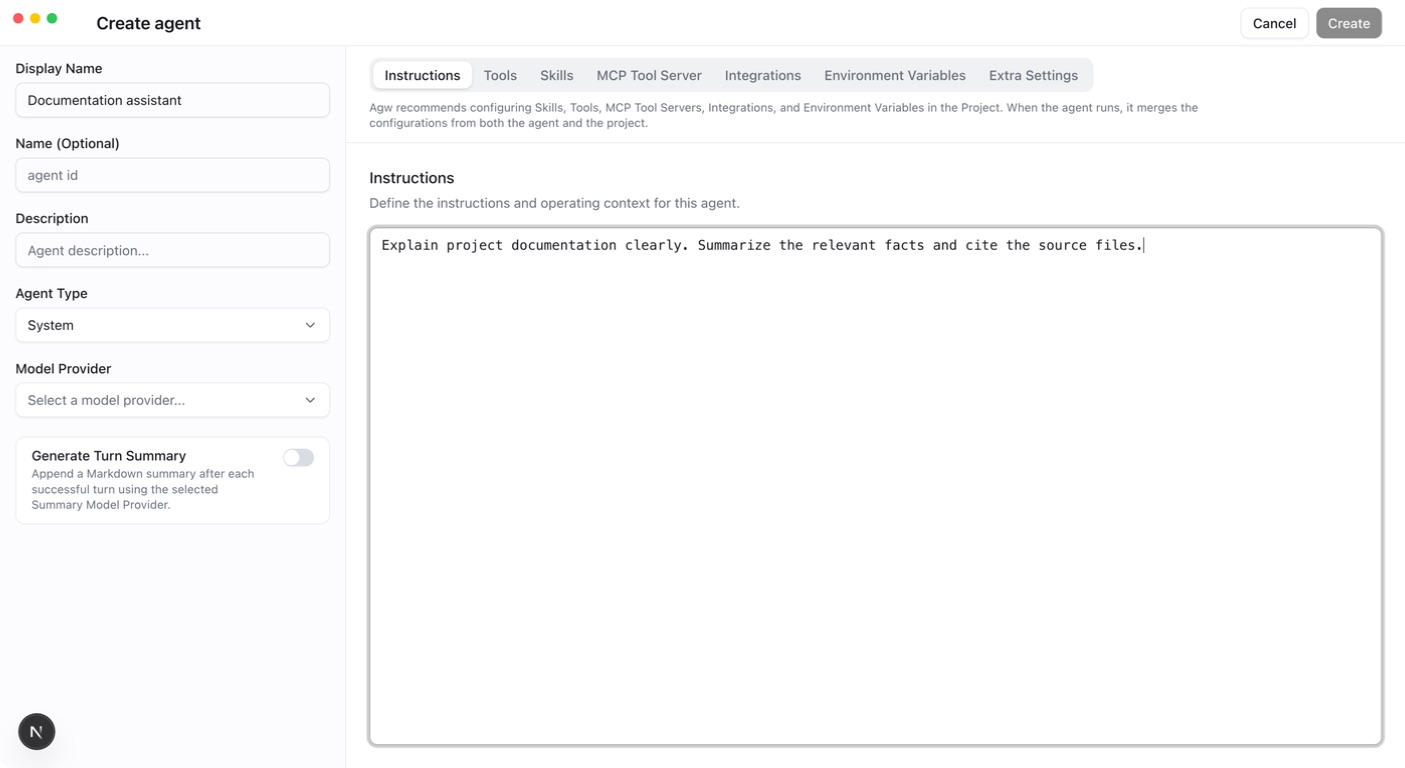
Give the agent a clear responsibility
Include the task scope and expected output in its instructions. For a documentation reviewer:
Test with a short pasted passage. To read project documents directly, add file-reading tools and run it in the correct Project. Instructions describe the task; actual tool configuration and permissions determine access.
Return replies as JSON
When a program reads the result, paste a JSON Schema object into the Response Schema tab of the create or edit dialog:
Saving requires valid JSON whose root is an object; an empty value turns structured output off. Anthropic models additionally require type set to object, properties as an object, and required as an array. The schema is passed to the model as the response format. When a custom agent also has “Generate Turn Summary” enabled, AGW requires exactly one JSON object or array in the last complete reply, or the turn fails; that JSON becomes the turn’s Result directly, without calling the Summary Model Provider.
Among external agents, Claude Code and Codex support this configuration. For Pi, the Response Schema tab is shown but disabled, and the Server rejects a schema. See Structured responses with JSON Schema for details.
Turn summaries
A custom agent can turn on Generate Turn Summary. After each successful turn, AGW uses the Summary Model Provider to append a Markdown summary as the turn’s Result; without a selection, it uses the agent’s own Model Provider. The summary input contains only this turn’s user text and the agent’s reply text, without history, tools, or Skills. External agents do not offer this switch.
With the switch on, the agent’s turns produce a Result, so Only Stream Turn Result in Conversation Settings also applies to it.
Edit and reuse
Definition changes take effect on the next turn while retaining the conversation identity. Active turns keep the configuration snapshot captured at their start, including permissions and directories.
Use Copy agent in the Agents list to copy any agent. Copying an External Agent keeps its engine kind, Model Provider, environment variables, Extra Settings, and Response Schema; Instructions, Tools, Skills, MCP Tool Server, and Integrations are not copied. Check the copied model, capabilities, and project environment before running it.
Verify
Ask a question matching the agent’s responsibility and inspect its tool activity. If tools are missing, check bindings, the tool catalog, and Connection readiness. Increasing permissions does not fix missing configuration.